Google Business Profile for local SEO decides whether your business shows up in Google Maps and the local pack. This 30-step checklist covers setup, optimization, reviews and tracking, and it tags every step by how much it moves rankings.
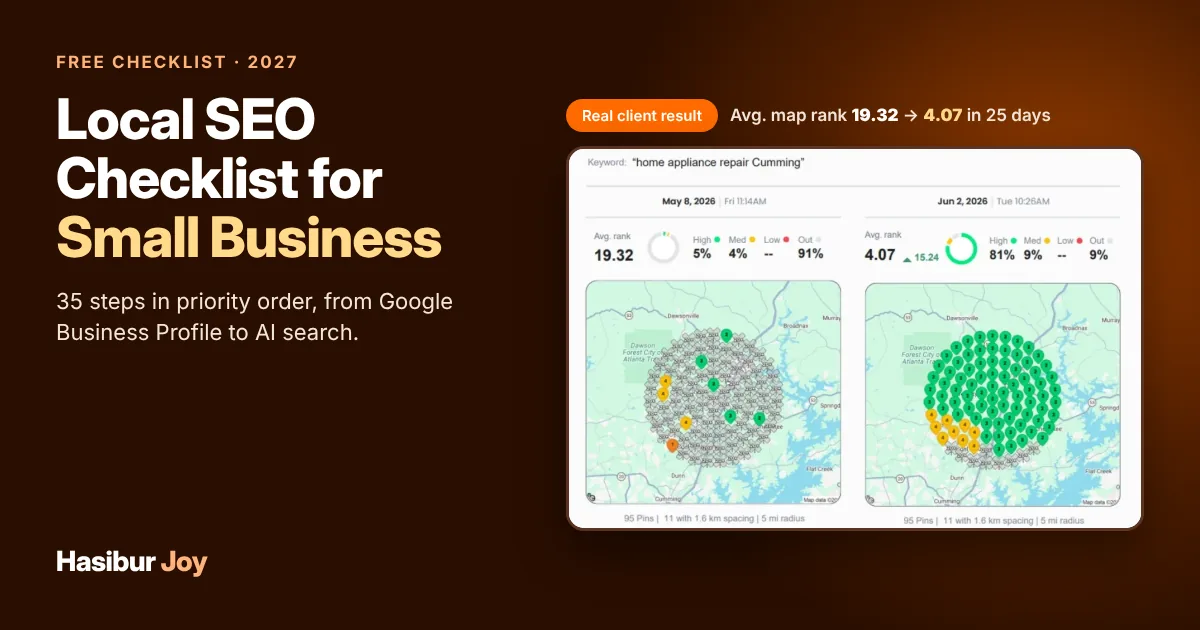
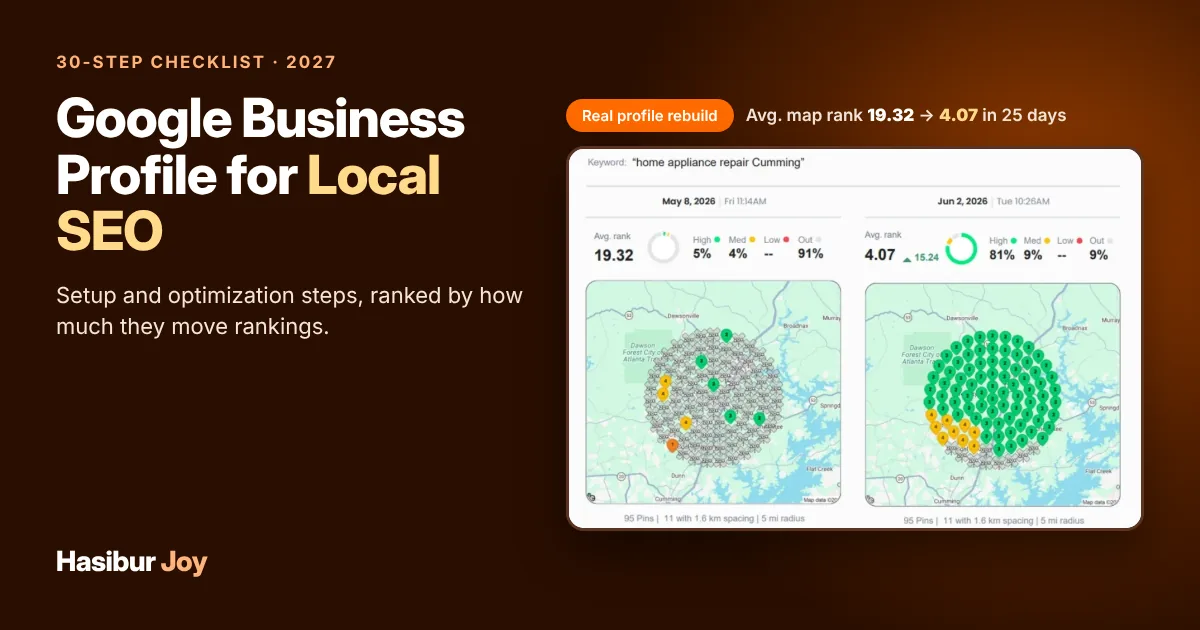
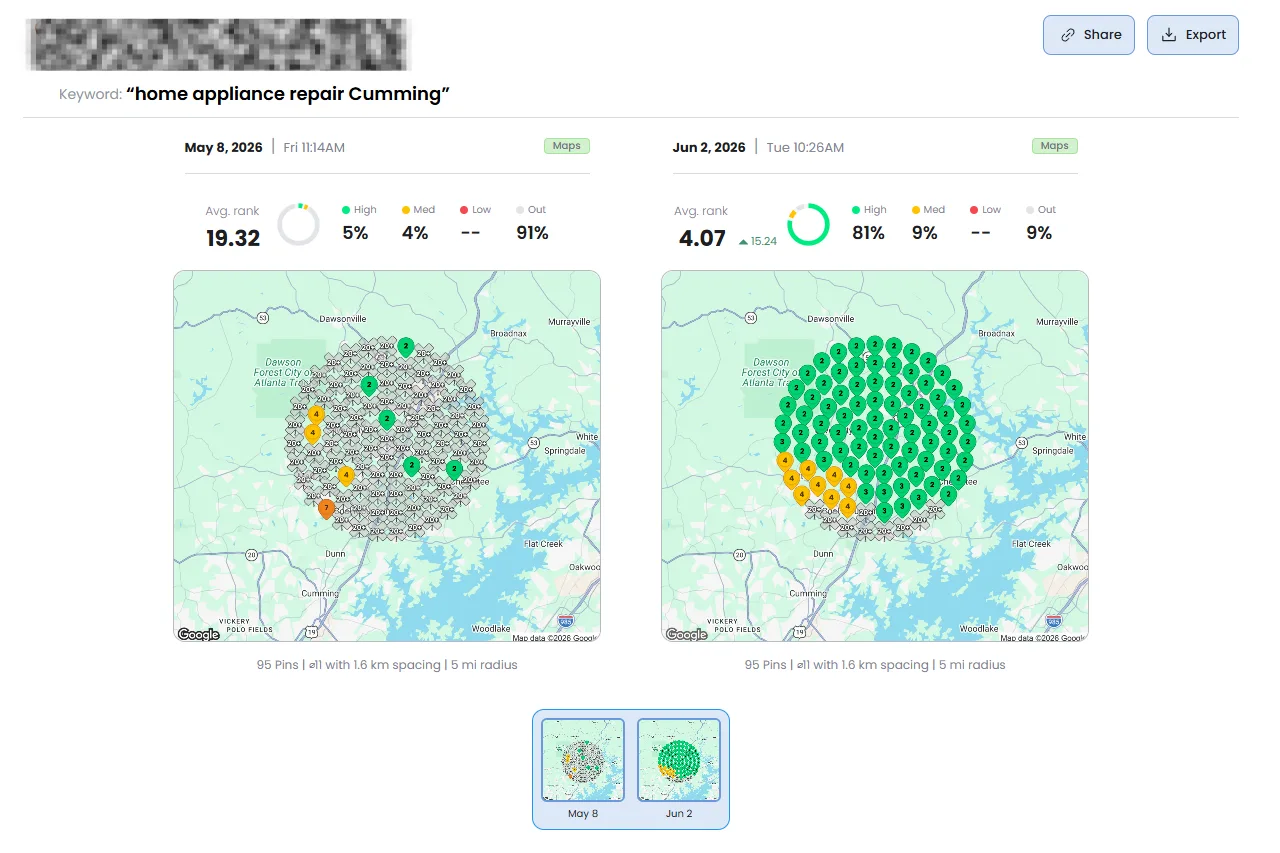
Reviews alone don't fix a weak profile. An appliance repair company in Cumming, Georgia had 20 genuine reviews and still didn't appear across 91% of its own service area. Its profile had no description, almost no photos and blank fields.
Hasibur Joy rebuilt that profile. In 25 days, high map visibility rose from 5% to 81%.
TL;DR
-
Ranking basis: Google ranks local results on relevance, distance and prominence, per Google Business Profile Help.
-
Biggest lever: the primary category is the #1 local pack factor in Whitespark's 2026 Local Search Ranking Factors report.
-
Completeness wins: fill every field Google offers. Completeness ranks #16, while description keywords rank #171.
-
Reviews: a steady flow of new reviews beats bursts, and every review gets a reply.
-
AI answers: Q&A is gone. Google's Ask Maps answers questions from your profile, reviews and website.
How Does Google Business Profile Affect Local SEO?
Google Business Profile affects local SEO by feeding all 3 signals Google uses to rank local results: relevance, distance and prominence. Google confirms that complete and accurate profiles are more likely to show up in local results.
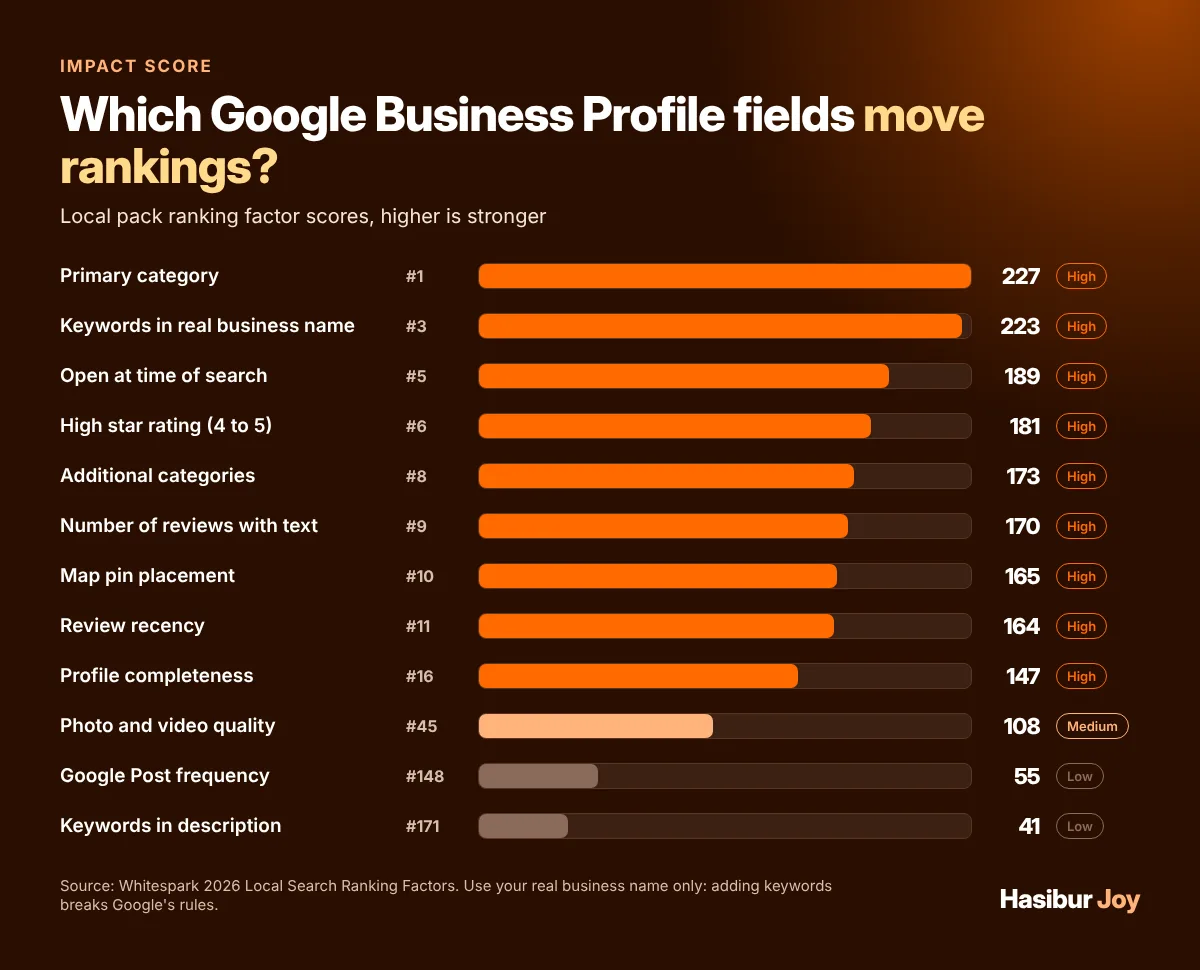
Some profile fields carry far more weight than others. Whitespark's 2026 survey of local SEO experts scores 4 profile factors in the top 6:
- Primary category: #1, score 227
- Keywords in the business name: #3, score 223 (use your real name only)
- Open at the time of search: #5, score 189
- High star rating: #6, score 181
The description and Google Posts sit near the bottom. Keywords in the description rank #171 with a score of 41, and post frequency ranks #148.
Every step in this checklist carries an impact tag based on those scores:
- High: a top-20 local pack factor
- Medium: a factor ranked 21 to 100, or a field that adds to profile completeness
- Low: a factor ranked below 100
The profile is one part of local SEO. The website, citations and links around it are covered in the local SEO checklist for small business.
Before You Start: Which Type of Business Are You?
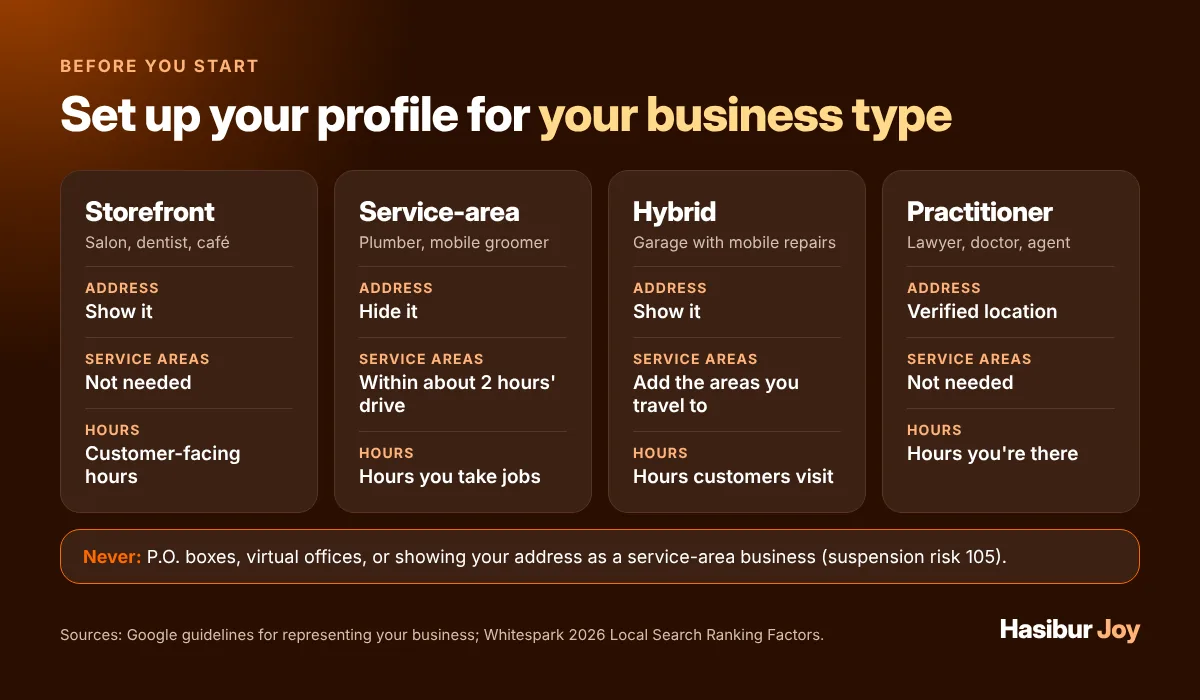
Your business type decides 3 settings before anything else: whether you show an address, whether you set service areas and how you list hours. Google's guidelines for representing your business set the rules.
| Business type | Example | Address | Service areas | Hours |
|---|---|---|---|---|
| Storefront | Salon, dentist, café | Show it | Not needed | Customer-facing hours |
| Service-area business | Plumber, mobile groomer | Hide it | Within about 2 hours' drive of base | Hours you take calls or jobs |
| Hybrid | Garage with mobile repairs | Show it | Add the areas you travel to | Hours customers can visit |
| Practitioner | Lawyer, doctor, estate agent | Show the verified location | Not needed | Hours you're there |
Google doesn't accept P.O. boxes or virtual offices. A co-working office qualifies only with signage, your own staff and customers received during business hours.
Getting this wrong carries a real cost. Showing your address as a service-area business carries a suspension risk score of 105 in Whitespark's 2026 report.
How to Set Up a Google Business Profile (Steps 1 to 8)
You set up a Google Business Profile in 8 steps: use a business-owned account, claim any existing listing, enter your real name, choose a primary category, set your address or service area, add contact details, verify and add managers. Every setup step is required.
- Use a Google account the business owns: Sign in at google.com/business with an account the owner controls, not a staff member's personal email. The owner role stays with the business even when an agency helps.
- Search for an existing listing first: Look your business up on Google Maps before creating anything. Claim a listing that already exists, because Google allows one profile per business and duplicates cause display problems.
- Enter your real-world business name: Use the name on your sign, website and invoices. Google bans added taglines, services and locations, so "Smith Plumbing" stays "Smith Plumbing", not "Smith Plumbing Emergency Plumber Leeds".
- Choose the primary category: Pick the most specific category that completes "This business IS a…", such as "Dog groomer" over "Pet store". Sterling Sky saw an HVAC client drop from #1 to #31 overnight after one primary category switch.
- Set your address or service area: Enter a precise street address, or hide it and list service areas if you travel to customers. Then check the map pin sits on your actual building, since pin placement ranks #10 in Whitespark's 2026 report.
- Add a local phone number and website: Use a number the business controls and a website link that doesn't redirect. A website URL that forwards to a different domain carries the highest suspension risk Whitespark added in 2026, a score of 115.
- Verify your profile: Complete the method Google offers you: phone or text, email, live video call, video recording or a postcard. Google picks the methods by business type, and verification reviews take up to 5 business days, per Google's verification guide.
- Add managers, keep the owner role: Give staff or your SEO provider manager access. Keep primary ownership on the business account, so nobody can lock you out of your own profile.
A postcard code usually arrives within 14 days and expires after 30 days. Request a new one if it lapses.
How Do You Audit Your Profile Against Competitors? (Step 9)
You audit your Google Business Profile by comparing it field by field with the top 3 businesses in the map pack for your main keyword. Every gap the audit shows becomes your fix list for the first week.
- Run a competitor audit before optimizing: Search your main keyword, such as "dog groomer near me", and note the 3 businesses in the map pack. Compare categories, photos, videos, reviews, services, products, social profiles and website signals in one sheet.
Hasibur Joy runs this audit before touching any client profile. Here's the real audit he ran for Vanessa Barber, a dog groomer in the UK, with competitor names removed:
| Signal | Client | Competitor A | Competitor B | Competitor C |
|---|---|---|---|---|
| Primary category | Pet groomer | Pet groomer | Pet groomer | Pet groomer |
| Secondary category | None | None | None | None |
| Service word in real business name | No | Yes | Yes | Yes |
| Photos | 10 | not recorded | 21 | 84 |
| Videos | 0 | 3 | 0 | 1 |
| Google reviews | 20 | 43 | 51 | 26 |
| Social profiles shown | No | Yes | No | Yes |
| Services listed | 53 | 16 | 4 | not recorded |
| Products listed | 0 | 9 | 0 | not recorded |
| Backlinks to website | 152 | 413 | 176 | 5 |
| LocalBusiness schema on site | No | No | No | not recorded |
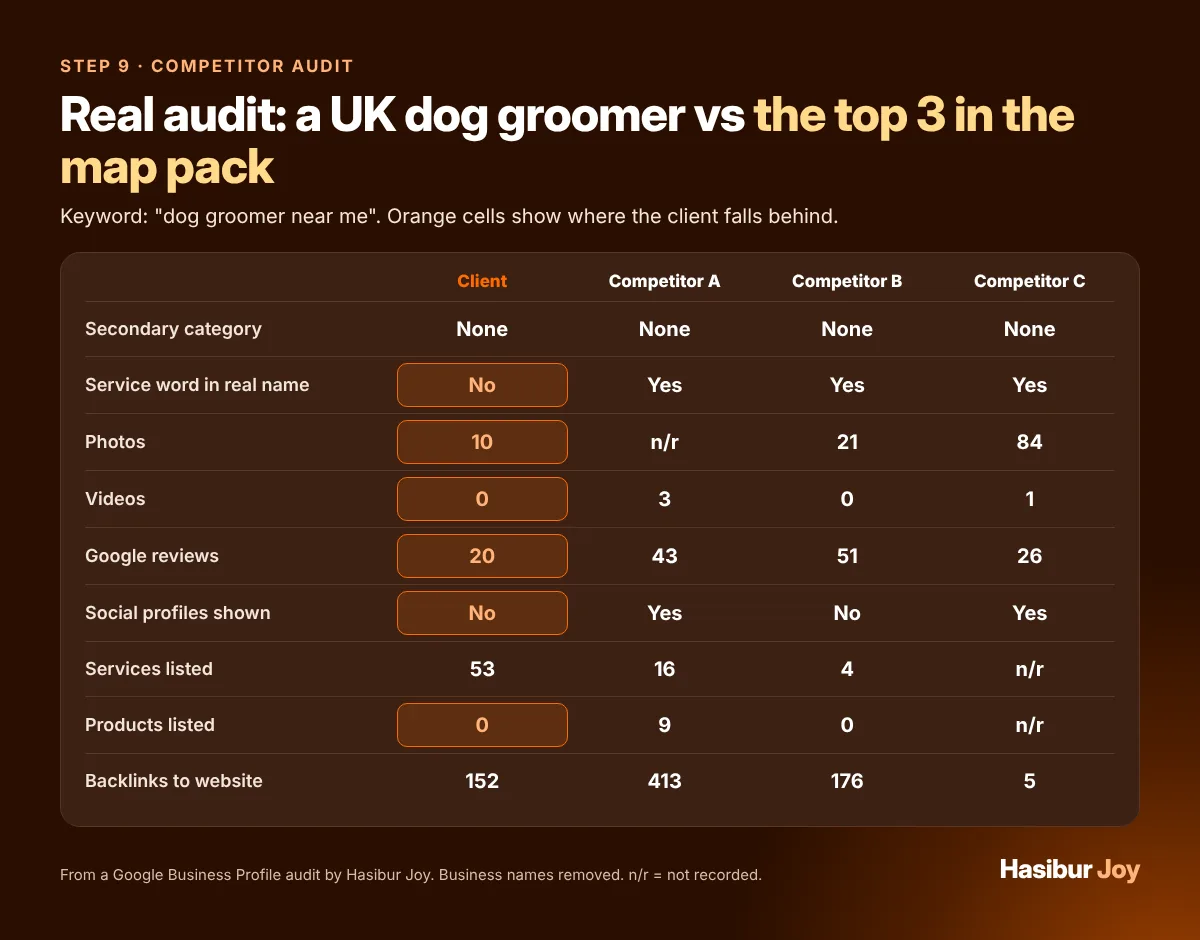
The audit turned into 5 clear fixes:
- Secondary categories: none of the 4 businesses had one, so adding relevant ones gives the client an edge nobody else has.
- Photos and video: 10 photos and no video against 84 photos and 3 videos.
- Social profiles: 2 of 3 competitors show them; the client doesn't.
- Products: one competitor lists 9 grooming packages as products; the client lists none.
- Reviews: 20 reviews against 26 to 51, so a steady review system matters most off the profile.
The business name gap stays. The competitors' real names contain service words, and the client's doesn't. Google's rules forbid adding them, so the client wins on the fields it controls.
How to Optimize Your Google Business Profile (Steps 10 to 22)
You optimize a Google Business Profile by filling every field Google offers, in order of impact: categories and hours first, then services, products, attributes, photos and the landing page. Profile completeness ranks #16 among local pack factors in Whitespark's 2026 report.
- Add secondary categories (High): Add every category that describes a real service line, such as "Dog day care center" for a groomer that offers day care. Additional categories rank #8, with a score of 173.
- Fill in services (Medium): Tick Google's pre-defined services, then add custom ones in your customers' words. Give each service a short description and a price where you have one.
- Add products (Medium): List packages and bundles as products, even as a service business, such as "Full groom, small dog, from £45". Products show as cards with a photo and price.
- Set regular and holiday hours (High): Enter accurate opening hours and add special hours for bank holidays. "Business is open at time of search" ranks #5, with a score of 189.
- Add attributes (Medium): Tick every attribute that's true, such as wheelchair access, online appointments or women-owned. Attributes answer filter searches and feed Ask Maps.
- Set the opening date (Medium): Add the year the business started. Sterling Sky recommends the oldest date the business can legitimately claim.
- Write the description for customers (Low): Use up to 750 characters to say what you do, where and why customers choose you. Keyword stuffing the description is a new negative factor in Whitespark's 2026 report, with a suspension risk of 35.
- Upload real photos (Medium): Add at least 10 photos of your premises, team, vehicles and finished work, then add new ones monthly. Photo quality ranks #45, and AI-generated photos carry a suspension risk of 45.
- Add short videos (Medium): Upload 30-second clips of real jobs, such as a before-and-after groom or a repair in progress.
- Set your logo and cover photo (Medium): Use your real logo and a clear photo of your best work or premises.
- Link the right landing page (High): Point the profile's website link to the page that best matches your main service and city. Keywords in the GBP landing page title tag rank #17. Sterling Sky warns against linking a page that already ranks organically for the same terms.
- Track the link and add a booking link: Add
?utm_source=google&utm_medium=organic&utm_campaign=gbpto the website link, and add a booking link if you take appointments. - Add social profiles (Medium): Link your Facebook, Instagram and other active profiles in the profile's social section. Sterling Sky notes Google takes up to 7 links and displays 5.
The free local keyword research tools guide shows how to find the service names customers search for, so steps 10 and 11 use their words, not yours.
How Do You Make Your Profile Ready for Ask Maps?
You make your profile ready for Ask Maps by putting the answers to customer questions into the fields Google reads: services, attributes, photo captions, review replies and your website. Google confirmed in December 2025 that it is replacing the Q&A section with an AI-powered Ask button, per Search Engine Roundtable.
Ask Maps answers draw on the business's profile information, reviews and website, according to BrightLocal. You can't type an answer into Ask Maps, so feed it these 5 ways:
- Services: describe each service with the details customers ask about, such as price, duration and who it suits.
- Attributes: tick every true attribute, from parking to accessibility.
- Photos: show what customers ask about, such as the waiting area, the van or the finished result.
- Review replies: answer the question inside your reply, such as "Yes, we groom nervous dogs in a quiet room."
- Website FAQs: answer the top 5 questions customers phone you about on your GBP landing page.
How Many Reviews Does a Google Business Profile Need? (Steps 23 to 27)
A Google Business Profile needs a steady flow of new reviews, not a one-off batch. Review quantity ranks #9, review recency #11 and a sustained flow over time #14 among local pack factors in Whitespark's 2026 report.
- Ask every customer for a review (High): Send a review request after every finished job, by text or email. Ask every customer, not only the happy ones.
- Follow Google's review policy (High): Never offer discounts or gifts for reviews, filter out unhappy customers or tell customers what to write. Google's review policy bans incentives, selective requests and attempts to shape what a review says.
- Reply to every review within 48 hours (Medium): Thank customers by name and answer complaints with a fix and a contact route. Replies show future customers how you handle problems.
- Share a short review link (Medium): Copy the review link from your profile dashboard into texts, emails, invoices and a QR code at the counter.
- Publish a Google Post each week (Low for ranking): Share an offer, a recent job or a seasonal tip. Posts rank #148 as a ranking factor, but they turn profile views into calls and give Ask Maps fresh material.
What Gets a Google Business Profile Suspended?
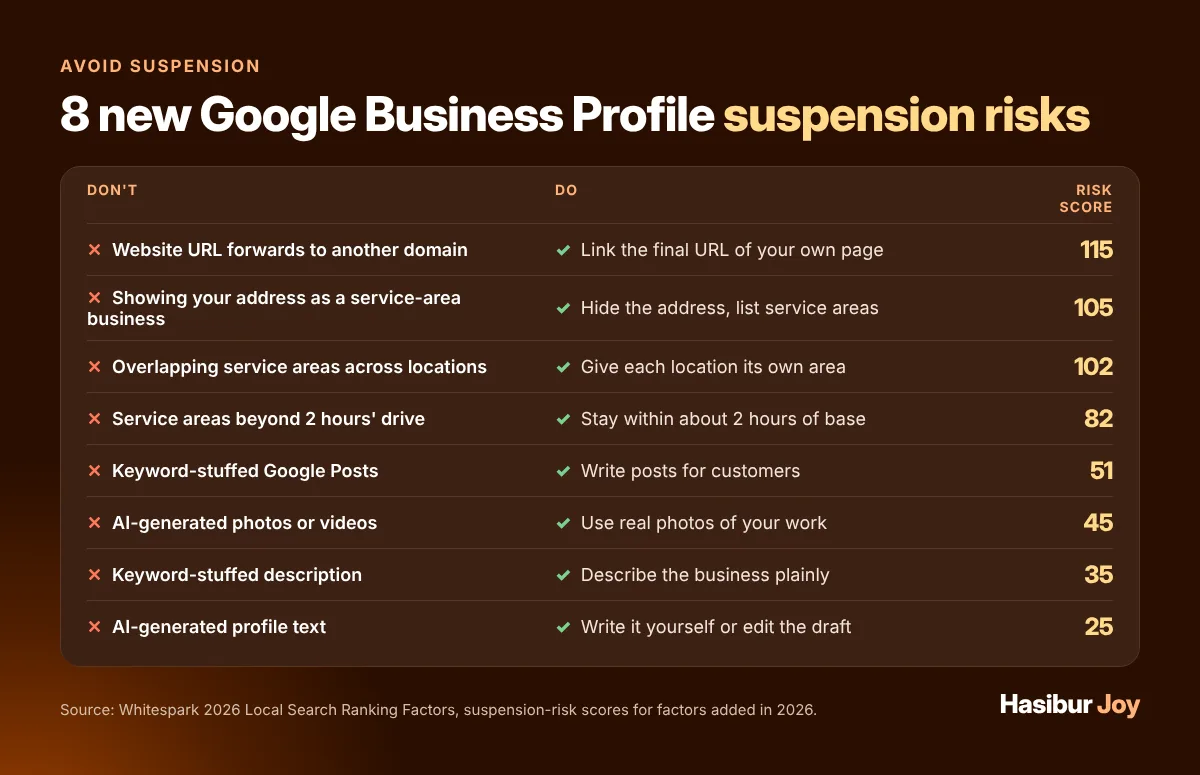
A Google Business Profile gets suspended for breaking Google's rules on names, addresses, service areas, links and fake content. Whitespark added 8 negative and suspension-risk factors in its 2026 report.
| Don't | Do | Suspension risk (Whitespark 2026) |
|---|---|---|
| Link a website URL that forwards to another domain | Link the final URL of your own page | 115 |
| Show your address as a service-area business | Hide the address and list service areas | 105 |
| Overlap service areas across multiple locations | Give each location its own area | 102 |
| Set service areas beyond 2 hours' drive | Stay within about 2 hours of your base | 82 |
| Keyword-stuff Google Posts | Write posts for customers | 51 |
| Upload AI-generated photos or videos | Use real photos of your work | 45 |
| Keyword-stuff the description | Describe the business in plain words | 35 |
| Publish AI-generated profile text | Write it yourself, or edit any AI draft | 25 |
Google's own rules add 3 more: use your real-world name, never a P.O. box or virtual office, and keep one profile per location.
How Do You Track Google Business Profile Results? (Steps 28 to 30)
You track Google Business Profile results with 3 monthly checks: profile Performance data, tagged website visits in Google Analytics 4 and a geo-grid scan against your competitors.
- Review Performance monthly: Log calls, direction requests, website clicks, bookings and the search terms that found your profile.
- Check tagged visits in GA4: Filter traffic by the
gbpcampaign from step 21 to see which profile visitors book, call or buy. - Run a geo-grid scan: Track your map rank across a grid of points around your business, not from one spot, and compare it with the 3 competitors from step 9.
What Happens When You Fix a Google Business Profile?
A fixed Google Business Profile gives Google enough relevance signals to show the business across its service area. Two of Hasibur Joy's client profiles show what changes.
Appliance repair, Cumming, Georgia. The business had 20 reviews and its category was already right. The description was empty, photos were few, services and attributes were blank and it had never posted. Hasibur Joy rebuilt the profile in week 1, started citations on day 1 and tuned the website in week 2. Across 95 grid points for "home appliance repair Cumming", the average map rank moved from 19.32 to 4.07 between May 8 and June 2, 2026.
Dog groomer, UK. Vanessa Barber was a skilled groomer with a profile that undersold her. The competitor audit from step 9 showed the gaps: no secondary categories, missing attributes and a description that didn't explain her expertise.
Hasibur Joy fixed the whole profile at once. He added secondary categories and attributes, rewrote the description around her specialty, coached her on asking clients for reviews and started Google Posts about her experience.
No single change did the work. Within a week of the complete overhaul, she reported several new bookings.
"I've already had more enquiries, bookings have picked up. I'm really, really happy with the results."
Vanessa Barber, dog groomer
More profile results sit in the Baltimore massage studio case study, where the average map rank moved from 12.18 to 3.59, and the East London estate agent case study, with 66 calls from Google Maps.
Your 30-Day Google Business Profile Plan
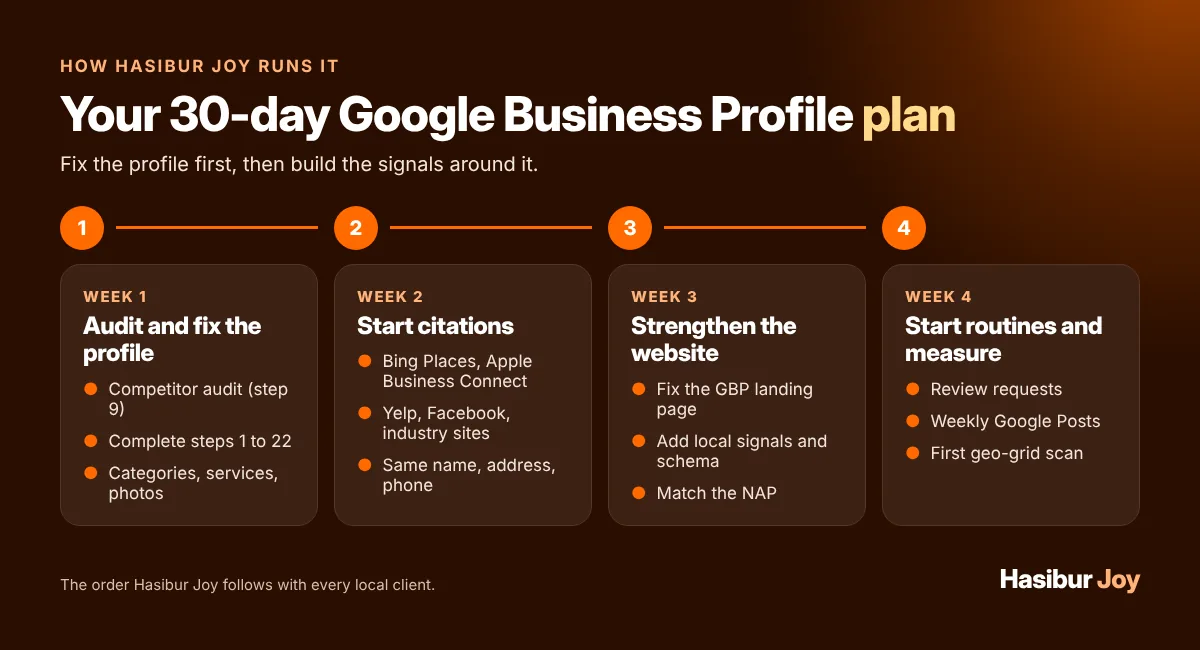
A 30-day plan fixes the profile first, then builds the signals around it. Hasibur Joy follows this order with every local client.
- Week 1, audit and fix the profile: Run the competitor audit (step 9), then complete every field from steps 1 to 22.
- Week 2, start citations: Match your name, address and phone on Bing Places, Apple Business Connect, Yelp, Facebook and your industry directories.
- Week 3, strengthen the website: Fix on-page gaps on the GBP landing page and count the local signals the site sends: city names, service pages, LocalBusiness schema and matching NAP.
- Week 4, start the routines and measure: Launch review requests and weekly posts, then run your first geo-grid scan.
Frequently Asked Questions
Is Google Business Profile free?
Yes. Creating, verifying and managing a Google Business Profile costs nothing. You pay only if you hire someone to set it up or run Google Ads.
How long does Google Business Profile verification take?
Google reviews most verifications within 5 business days. A postcard code usually arrives within 14 days and expires after 30 days.
Can I have a Google Business Profile without a storefront?
Yes. Service-area businesses hide their address and list the areas they serve, within about 2 hours' drive of their base. P.O. boxes and virtual offices aren't allowed.
Does the business description help Google Maps rankings?
No, not much. Keywords in the description rank #171 in Whitespark's 2026 report. Write the description for customers, and never stuff it with keywords.
What replaced Google Business Profile Q&A?
Ask Maps replaced Q&A. It's an AI feature in Google Maps that answers customer questions using your profile, reviews and website.
How often should I post on Google Business Profile?
Once a week works for most small businesses. Posts barely affect rankings, but they keep the profile active and give customers a reason to call.
Start Your Google Business Profile for Local SEO Today
Start with steps 1 to 9: set up the profile correctly, then audit it against the top 3 businesses in your map pack. Google Business Profile for local SEO rewards complete, accurate and active profiles, and most competitors leave fields empty.
Hasibur Joy, an SEO strategist with 8+ years of experience and 35+ small business clients, audits and rebuilds Google Business Profiles as part of his local SEO services for small business. Get a free SEO audit to see your profile gaps, or book a free consultation to plan the fix.
The Complete 30-Point Google Business Profile Checklist
Save this Google Business Profile checklist, or work through the text version below.
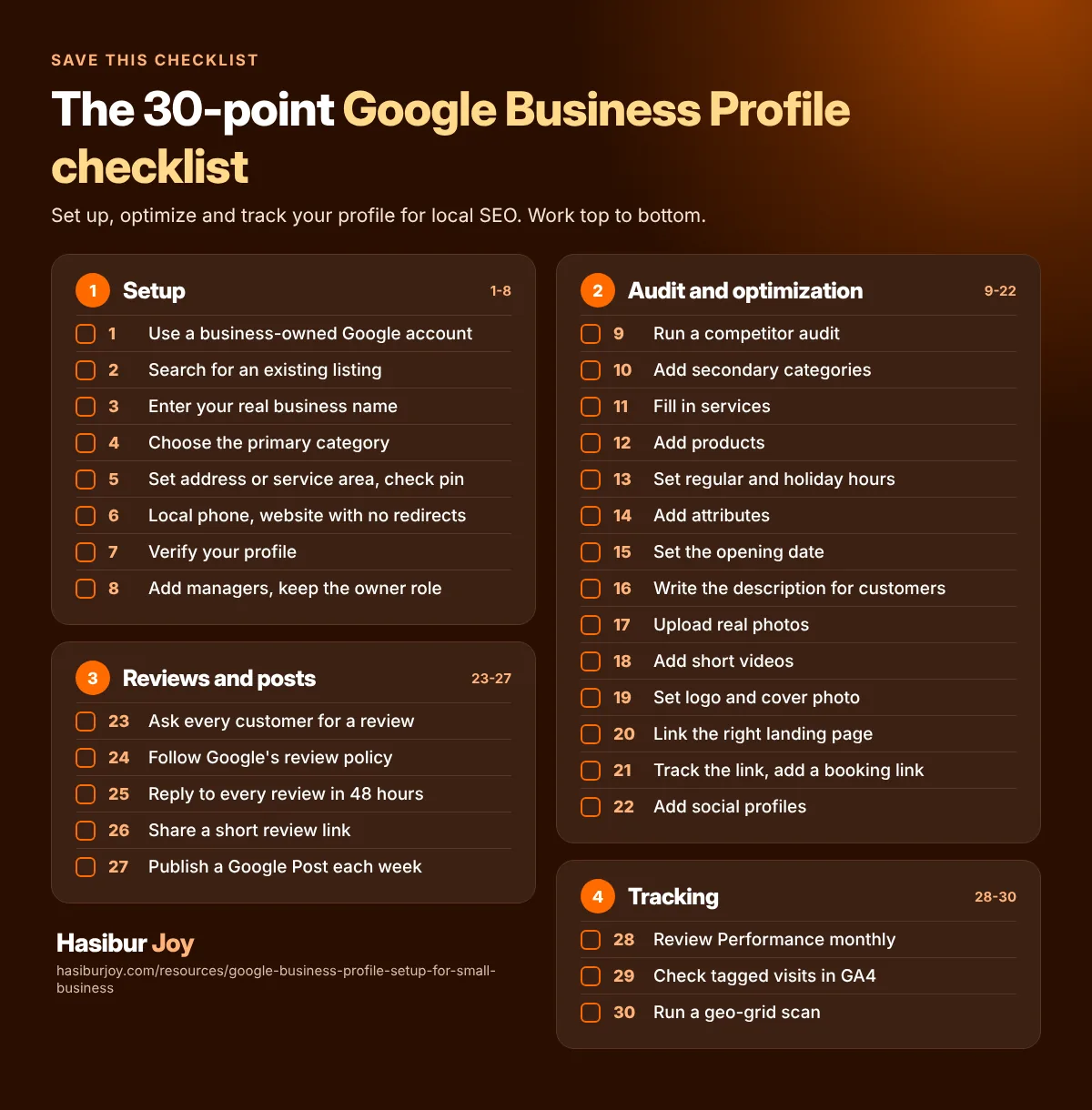
Setup
- Use a Google account the business owns
- Search for an existing listing first
- Enter your real-world business name
- Choose the primary category
- Set your address or service area and check the map pin
- Add a local phone number and a website with no redirects
- Verify your profile
- Add managers, keep the owner role
Audit and optimization
- Run a competitor audit
- Add secondary categories
- Fill in services
- Add products
- Set regular and holiday hours
- Add attributes
- Set the opening date
- Write the description for customers
- Upload real photos
- Add short videos
- Set your logo and cover photo
- Link the right landing page
- Track the link and add a booking link
- Add social profiles
Reviews and posts
- Ask every customer for a review
- Follow Google's review policy
- Reply to every review within 48 hours
- Share a short review link
- Publish a Google Post each week
Tracking
- Review Performance monthly
- Check tagged visits in GA4
- Run a geo-grid scan